All projects

DOCSAGA · KNOWLEDGE & DOCUMENTATION

A wiki you can keep current.

Document and illustrate what you need to know. Let people, tools and integrations update information, with clear ownership and the ability to review changes.

BetaSelf-hostedAPI + MCP
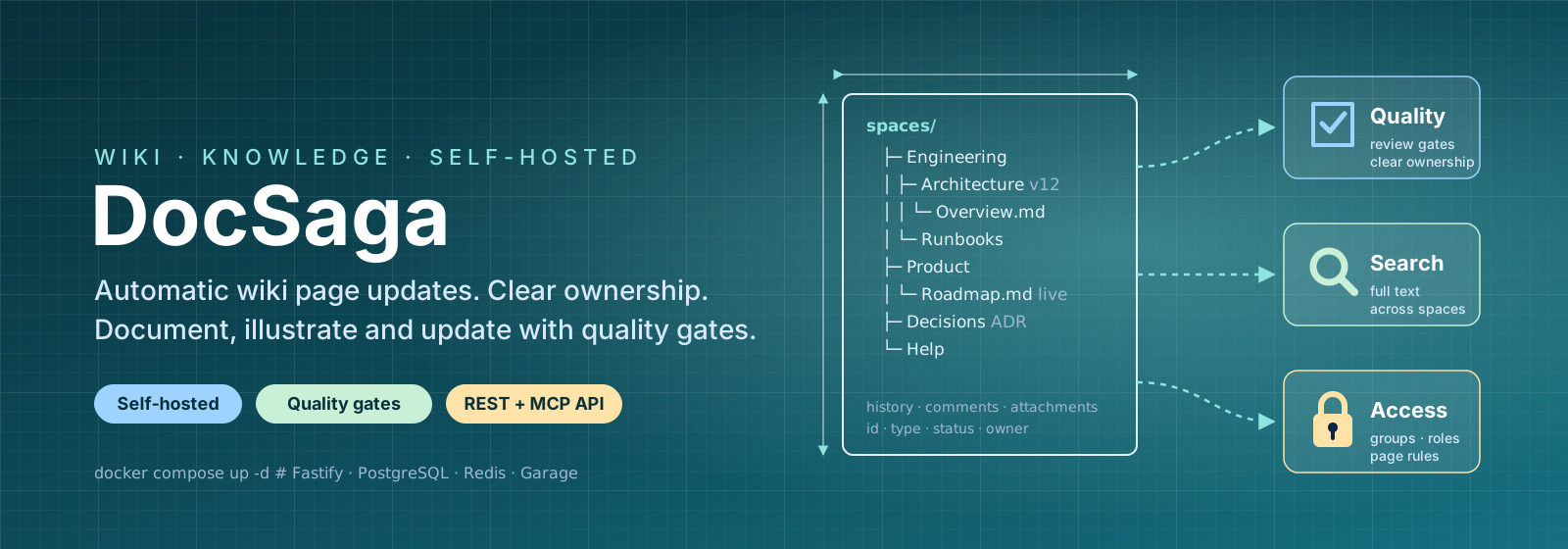
DocSaga: automated wiki updates, documentation and illustration with quality gates and clear ownership

Document and explain

Bring knowledge, diagrams and instructions together. Make it easier to understand how things connect.

Keep information current

Let tools update pages and display information from other systems. Avoid entering the same details in several places.

Keep ownership and oversight

See who is responsible, what has changed and when content needs review.

FEATURES THAT GROW WITH YOU

Start simple.
Add what you need.

The foundation is always included. Enable more features when you need them. Disabling a feature does not delete its content.

Under evaluation means implemented and being tested by the owner. We use the features, test them in practice and evaluate how they work.

The foundation for your knowledge

A wiki that gives your team’s knowledge a home.

  1. 01
    Gather your knowledge

    Organise the team’s documentation in workspaces and page trees.

  2. 02
    Write and find

    Write with the wiki editor’s core tools for text, lists, links and tables. Search the knowledge you can access.

  3. 03
    Keep the history

    Permissions, versions and restoration are always included.

Details and features
  • Workspaces and page trees
  • Markdown editing and publishing
  • Core wiki editor tools: headings, text formatting, lists, links, quotes and code blocks
  • Tables, images and attachments
  • Undo and redo in the editor
  • Search that respects the reader’s permissions
  • Roles, page access and audit history
  • Version history and restoration
DocSaga / coreExample
PlatformOverviewArchitectureGetting startedProcedures

Platform overview

A shared starting point for the team’s documentation.

Version history
Back to feature index

The right access. Clear boundaries.

Security for people, tools and connected systems.

  1. 01
    Control login

    Connect your identity provider through OIDC or use local login with two-factor authentication.

  2. 02
    Scope access

    People and tools follow the same page permissions. API and MCP keys limit what tools can do.

  3. 03
    Keep background work separate

    A worker runs background jobs and retrieves approved source data. Connection secrets stay on the server.

Details and features
  • OIDC/SSO with a configured identity provider linked to existing user accounts
  • TOTP two-factor authentication for local login
  • Time-limited sessions, rotating refresh tokens and session revocation
  • Roles, groups and page permissions that also govern search and attachments
  • Hashed API and MCP keys with scoped permissions and workspaces
  • Tool access follows the user’s permissions
  • A separate worker process for queued and scheduled background jobs outside the web request flow
  • Data source secrets are handled by the worker on the server
  • Approved data sources, validated updates and protection against unauthorised network requests (SSRF)
  • Audit log for security, administration and integration events
  • Page content sanitisation and uploaded file type validation
  • Security headers, restricted CORS origins and rate limiting
  • OIDC and external connections are configured for each installation
DocSaga / securityExample

The right person. The right access.

From login to connected tools.

Login
OIDC / local account
Page access
Roles and permissions
API / MCP
Scoped keys
The same access rules for people and tools
API Job queue Worker
Background jobs in a separate process

Source secrets are handled on the server.

Audit logValidated source dataRestricted access
Back to feature index

Explain with more than text

Make complex relationships easier to understand.

  1. 01
    Show the connections

    Let diagrams explain what is hard to put into words.

  2. 02
    Choose your format

    Work with diagrams, data tables, page lists, statistics and reusable blocks.

  3. 03
    Keep the context

    Show GitHub Issues, Azure DevOps and Jira issues, and repository activity on the page where they are needed.

Details and features
  • Visual content blocks and diagrams
  • Mermaid and diagram rendering
  • Specialised editors including draw.io, Excalidraw and BPMN
  • CSV and JSON data tables with sorting and filtering
  • Page lists and queries showing selected pages and their properties
  • Statistics blocks and bar charts based on page properties
  • Dynamic page attributes and status badges in text and blocks
  • Shared and included blocks for reusable content
  • Layouts with columns, collapsible blocks and link buttons
  • Insert structured blocks and preview them directly in the editor
  • Display GitHub Issues, Azure DevOps work items and Jira issues from approved views
  • Git repository blocks with latest commit, activity, pull requests, issues, release, CI status and languages
  • External issues and repository blocks use approved data sources through Integrations
  • Blocks with page types and custom properties also use Content structure
  • Visual editors and rendering depend on the interface and installation
DocSaga / visual contentExample

How it fits together

An architecture illustration, right in the documentation.

Web API Data
DiagramProcessesSketches
Advanced content blocks
Data tablesPage queriesStatisticsDiagramShared blocksColumns
Connected systems · through Integrations
GitHub IssuesAzure DevOpsJiraGit repository
Latest commit
Update operating procedures
Pull requests
2 open
CI-status
Passed
Back to feature index

Give content a shared structure

Create a structure you can reuse.

  1. 01
    Start with a template

    Give recurring pages a shared starting point.

  2. 02
    Describe with properties

    Use page types and fields for information such as environment, team and service.

  3. 03
    Connect the knowledge

    Tags and relationships make content easier to find and understand.

Details and features
  • Reusable page templates and starting points
  • Page types with custom properties
  • Tags and typed relationships between pages
DocSaga / content structureExample
Page type: Service

Payments API

Created from the team’s service template.

Environment
Production
Team
Platform
Related page
Operating procedures ↗
APIPlatform
Back to feature index

Clear content ownership

Help knowledge stay useful over time.

  1. 01
    Make ownership visible

    Give documentation an owner who can keep it current.

  2. 02
    Review regularly

    Use review cycles and track content freshness.

  3. 03
    Show the evidence

    Connect reviews and quality context to the documentation.

Details and features
  • Owners and review cycles
  • Freshness and review history
  • Evidence and quality context for documentation
DocSaga / governanceExample

Operating procedures

Clear responsibility, even after publication.

Platform teamResponsible for the content
Reviewed
Every month
Latest review
Completed
Evidence
Operations report ↗
Back to feature index

Discuss where the knowledge lives

Keep the discussion on the page it concerns.

  1. 01
    Ask in the right place

    Comment directly on the page the discussion concerns.

  2. 02
    Keep the conversation together

    Keep questions and answers alongside the knowledge.

  3. 03
    Follow what is happening

    Notifications help the team follow the discussion.

Details and features
  • Comments and page discussions
  • Content-related notifications
DocSaga / collaborationExample

Discussion about operating procedures

A
Alex

Should we add the recovery step here?

S
Sam

Yes, I have an example from the latest test.

The conversation stays on the right page.
Back to feature index

Help readers move forward

Show the path from a question to the next step.

  1. 01
    Show the next step

    Link to related pages and prerequisites.

  2. 02
    Help readers choose

    Decision trees lead from a question to the right instructions.

  3. 03
    Hand over clearly

    Runbook handoffs provide guidance without executing automation.

Details and features
  • Related pages, prerequisites and next steps
  • Decision trees with clear choices
  • Runbook handoffs: instructions that do not execute automation
DocSaga / guided navigationExample

What do you need to do?

Choose the path to the right instructions.

Install a service
Troubleshoot a problem
Restore an environment
Read the prerequisites before starting.
Back to feature index

Take your documentation with you

Share a page or an entire workspace as files.

  1. 01
    Share a page

    Take documentation with you as PDF or Markdown.

  2. 02
    Take a workspace with you

    Collect a workspace’s published pages in a ZIP export.

  3. 03
    Export reports

    Create PDF administration reports.

Details and features
  • PDF and Markdown page exports
  • ZIP workspace exports
  • PDF administration reports
DocSaga / publishing exportExample

Documentation, ready to share

A page, a workspace or a report.

PDF Export
Markdown Export
ZIP Export
Bring the knowledge into its next context.
Back to feature index

Share knowledge beyond your team

Turn selected documentation into a website.

  1. 01
    Choose what to share

    Publish a workspace as its own documentation website.

  2. 02
    Make knowledge accessible

    Let visitors read published content without logging in.

  3. 03
    Keep it read-only

    The public website displays content in read-only form.

Details and features
  • Publish a workspace as a public website
  • Reading without login
  • Read-only presentation of published content
DocSaga / public sitesExample
Public documentation
Team handbookGetting started · Guides · Reference

Welcome to our documentation

Selected pages available to read without logging in.

Readable. Read-only. Published.
Back to feature index

Let tools keep the wiki current

Connect documentation to the work around it.

  1. 01
    Connect your tools

    Let tools and agents work with pages through API and MCP.

  2. 02
    Keep details current

    Display validated information from approved data sources.

  3. 03
    Review when needed

    Change proposals can be assessed before approval.

Details and features
  • API keys and MCP for tools and agents
  • Page content sync and updates
  • Approved data sources, validated updates and data blocks
  • Webhooks and reviewable change proposals
DocSaga / integrationsExample

Information that follows the work

From a connected source to the wiki.

Source Update Wiki
Version from source
1.4.2
Freshness
Current
Back to feature index

Share between installations

Mirror selected knowledge to another DocSaga.

  1. 01
    Choose the knowledge

    Decide which workspaces to mirror.

  2. 02
    Verify the recipient

    Share with a trusted DocSaga installation.

  3. 03
    Mirror in one direction

    Keep selected workspaces available on another installation.

Details and features
  • Verified connections between installations
  • One-way mirroring of selected workspaces and identities
DocSaga / federationExample

Selected knowledge, in more places

One-way mirroring to a verified installation.

DocSaga A DocSaga B
Platform handbook Mirrored
Selected workspaces only.
Back to feature index

Make knowledge easier to learn

Let readers learn by following the steps.

  1. 01
    Build a walkthrough

    Break knowledge into clear, interactive steps.

  2. 02
    Learn by following

    Guide readers through the content at a comfortable pace.

  3. 03
    Save progress

    Let readers continue their walkthrough where they left off.

Details and features
  • Interactive step-by-step lessons
  • Guided walkthroughs and saved progress
DocSaga / lessonsExample
INTRODUCTION · STEP 2 OF 3

Get to know the platform

A walkthrough that takes you from an overview to understanding.

  1. Find the documentation
  2. 2 Understand the architecture
  3. 3 Follow the operating procedures
Follow the steps at your own pace.
Back to feature index

Get help moving forward

Get help with a first draft or your next sentence.

  1. 01
    Get started with the text

    Get suggestions for structuring a page.

  2. 02
    Improve a draft

    Get help with wording, tags and publication messages.

  3. 03
    Stay in control

    You decide which suggestions to use.

Details and features
  • Page structure and rewrite suggestions
  • Tag suggestions and publication messages
  • Suggestions you decide whether to use
DocSaga / ai assistExample
Suggested rewrite

Make the instructions clearer

Your text

Restart the service if needed.

Suggestion

Check the service status. If it does not respond, follow the restart procedure.

You decide what to use.
Back to feature index

INTEGRATIONS & AUTOMATED UPDATES

The platform changes.
Let the information keep up.

Display version numbers, service status and environment information directly on a wiki page. An approved data source or connected tool updates the information, so you do not have to enter the same details in several places.

ILLUSTRATION · A PLATFORM PAGE

Documentation and current data.
On the same page.

  1. 01
    The team explains

    The team writes and illustrates the description and architecture.

  2. 02
    The source updates

    Versions and status come from an approved source, with timestamps and freshness information.

  3. 03
    The owner oversees

    Page ownership and reviews show who is responsible for the documentation.

Platform / OverviewExample

Our platform

How the services fit together.

Web API Data
Information from a connected source
Environment
Production
Version
1.4.2
Service status
Available

Last retrieved: 10:42 · Current

Owner: Platform teamReviewed every month
UPDATE DATA ON THE PAGE

Let a source provide the details

Approved sources can be fetched in the background or deliver validated updates. The page displays a stored data block with information about data freshness.

Data sourceValidationData block in the wiki
UPDATE THE DOCUMENTATION ITSELF

Let tools work with the pages

API, MCP and sync can create and update page content. Changes that need approval can be submitted as reviewable proposals with evidence and a comparison of changes.

Tool or agentAPI / MCP / syncPage content

A source needs to be configured or connected through a tool that delivers the right information. Access and publishing follow DocSaga’s permissions.

BUILT WITH
  • Node.js
  • TypeScript
  • Fastify
  • PostgreSQL + pgvector
  • Redis
  • React
  • Docker